
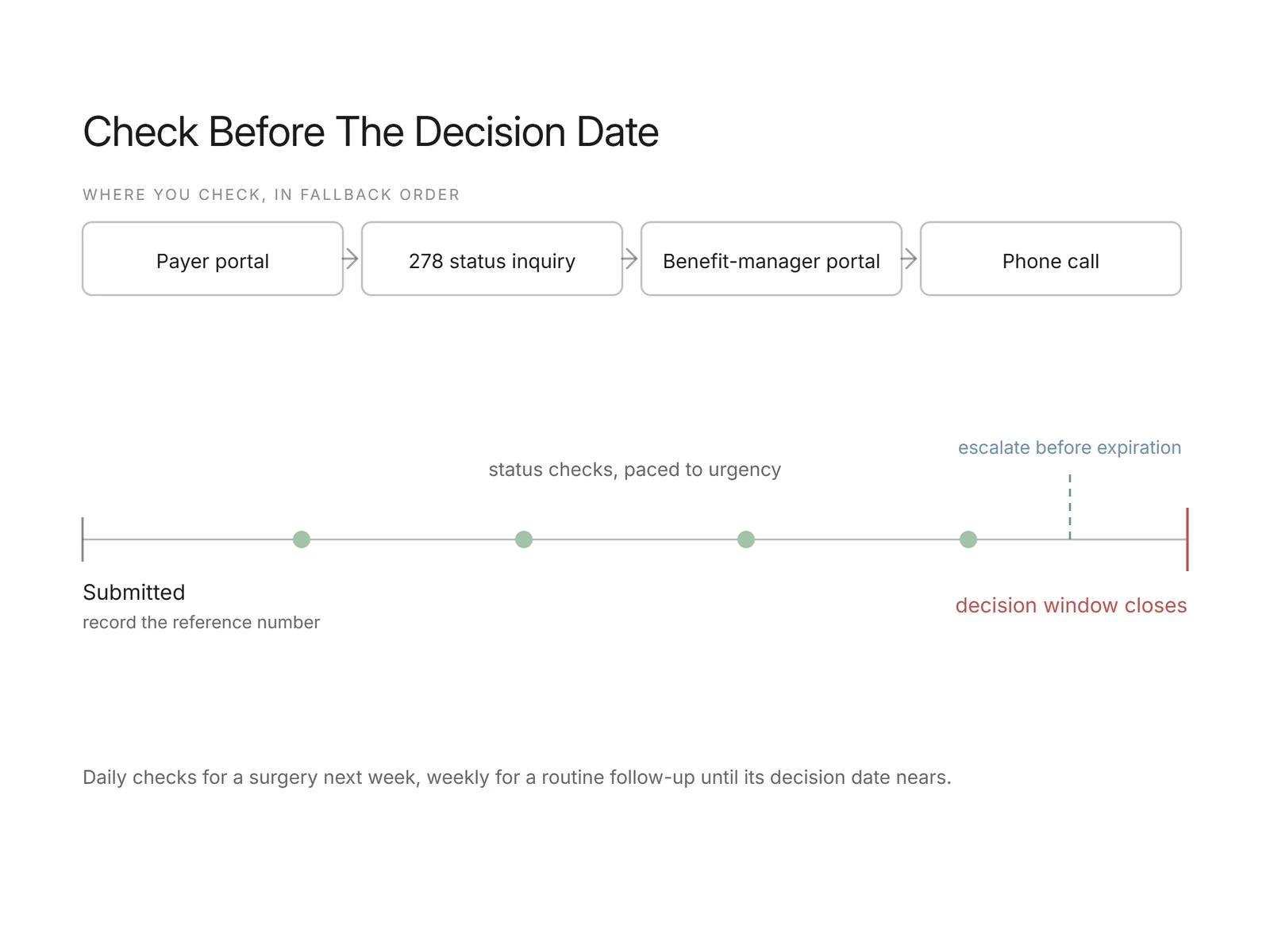
You check prior authorization status through one of four channels: the payer's provider portal, an electronic 278 status transaction where the payer supports it, a clearinghouse or benefit-manager portal, or a phone call to the payer. The right channel depends on the payer and on how the request was submitted, so the fastest path is usually the same system that received the original request. Start there, read the current decision and its reference number, and fall back to a call only when the online channels do not return a clear answer. Prior authorization is a heavy workload to track: the American Medical Association reports physicians complete about 39 prior authorizations per week, spending roughly 13 hours on them, which is why a disciplined way to check status matters.
What is the 278 transaction?
The 278 is the standardized X12 EDI transaction for prior authorization, the request-and-response counterpart to the 270/271 pair used for eligibility. A provider sends a 278 request carrying the patient, the requested service, and supporting clinical detail, and the payer returns a 278 response with a status, certified, pended, or denied, plus a reference number. These are the same family of HIPAA administrative transactions that CMS documents for provider-payer exchange, alongside the 270/271 eligibility inquiry and response. Where a payer supports the 278 inquiry, you can query status electronically and parse the answer into structured fields rather than reading a portal by hand. Support is uneven, though: many payers accept a 278 request but still route status back through a portal or phone, so treat the 278 as one channel to check per payer, not a guarantee.
Want this mapped against your own call and claim volume? Book a 30-minute audit
How do you check status in a payer portal?
You check status in a payer portal by logging into the provider site, opening its authorization or referral section, and searching for the case by member ID and date of service or by the authorization reference number. The result page shows the decision, the approved units or date span, and any note about what the payer is still waiting on. Read that note carefully: a pended status often means the payer needs specific clinical documentation, and the portal usually names it. Each payer's portal has its own login, layout, and terminology, so a service marked "in review" on one plan may read "pending medical review" on another. Record the reference number and the decision in your practice system so the next person who touches the case does not repeat the lookup.
Status checking is pure repetition: log in, search, read, record, and repeat for every open request every few days. Flexbone runs that loop with browser agents on a schedule and calls the payer line with a voice agent when a portal shows nothing, then records the result in the chart. More in prior authorization automation.
See what AI can run at your facility. In a 30-minute audit we map the calls, eligibility, and follow-ups Flexbone can take off your team first.
Book an auditHow long should a prior authorization take?
How long a prior authorization takes varies by payer, by plan, and by whether the request is standard or expedited, so there is no single timeframe that applies everywhere. CMS has set a standard for Medicare Advantage organizations to decide standard requests within seven calendar days and expedited requests within 72 hours, and several states set their own decision limits for commercial plans. Read the timeframe each payer publishes for the specific service rather than assuming a common one, because a surgical authorization and a routine imaging authorization can sit on different clocks with the same payer. For status tracking, set your follow-up cadence against the payer's own stated window: check before the decision date arrives, not after, so a request that has quietly pended for missing records does not burn the whole window before anyone notices.
What do you do if it is stuck or expiring?
When an authorization is stuck or approaching expiration, work the reference number first and confirm the exact status before doing anything else. If the request is pended, find out precisely what the payer is waiting on, usually a clinical note, an order, or documentation of a tried-and-failed prior treatment, and send only what the policy asks for so you do not restart the review. If it has stalled past the payer's stated decision window, escalate through the expedited or supervisor path rather than resubmitting from scratch, since a fresh submission can reset the clock. If the approval itself is close to expiring before the service is rendered, request an extension or a date change ahead of the expiration date, because an expired authorization typically means denied claims and a fresh appeal. Track each escalation with a date and a note so the case has a clear history if it later needs one.
A status-tracking workflow that holds up
A reliable status-tracking workflow rests on three habits. First, record the reference number and the payer's decision window the moment a request is submitted, in a field your whole team can see. Second, set a follow-up cadence by service urgency: a surgery scheduled next week needs a check every day or two, while a routine follow-up can sit on a weekly touch until its decision date nears. Third, escalate before expiration, not after, so the request moves through the payer's expedited or extension path while the option is still open. The bottleneck here is rarely judgment; it is the volume of portal logins and hold time. This is where AI agents fit: browser agents log into each payer portal and read the current status into structured fields, and voice agents place the status calls and sit through the phone tree and hold queue, so staff pick up a case only when there is a decision or an exception to act on. Automating status the same way you automate the front end keeps the two connected, which pairs naturally with prior authorization automation and upstream insurance eligibility verification.
How Flexbone tracks prior authorization status
Flexbone deploys AI browser and voice agents that check prior authorization status inside your existing workflow. Browser agents log into payer and benefit-manager portals and write the decision and reference number back to your system, while voice agents place status calls to payers that do not expose status online and stay on hold so your team does not. Escalations and unclear decisions route to a person, and status feeds straight into denial handling, which ties into our AI denials management work. If you want to see what this could take off your prior authorization follow-up, book a call with Flexbone and we will run a quick audit of your current status-tracking workload.