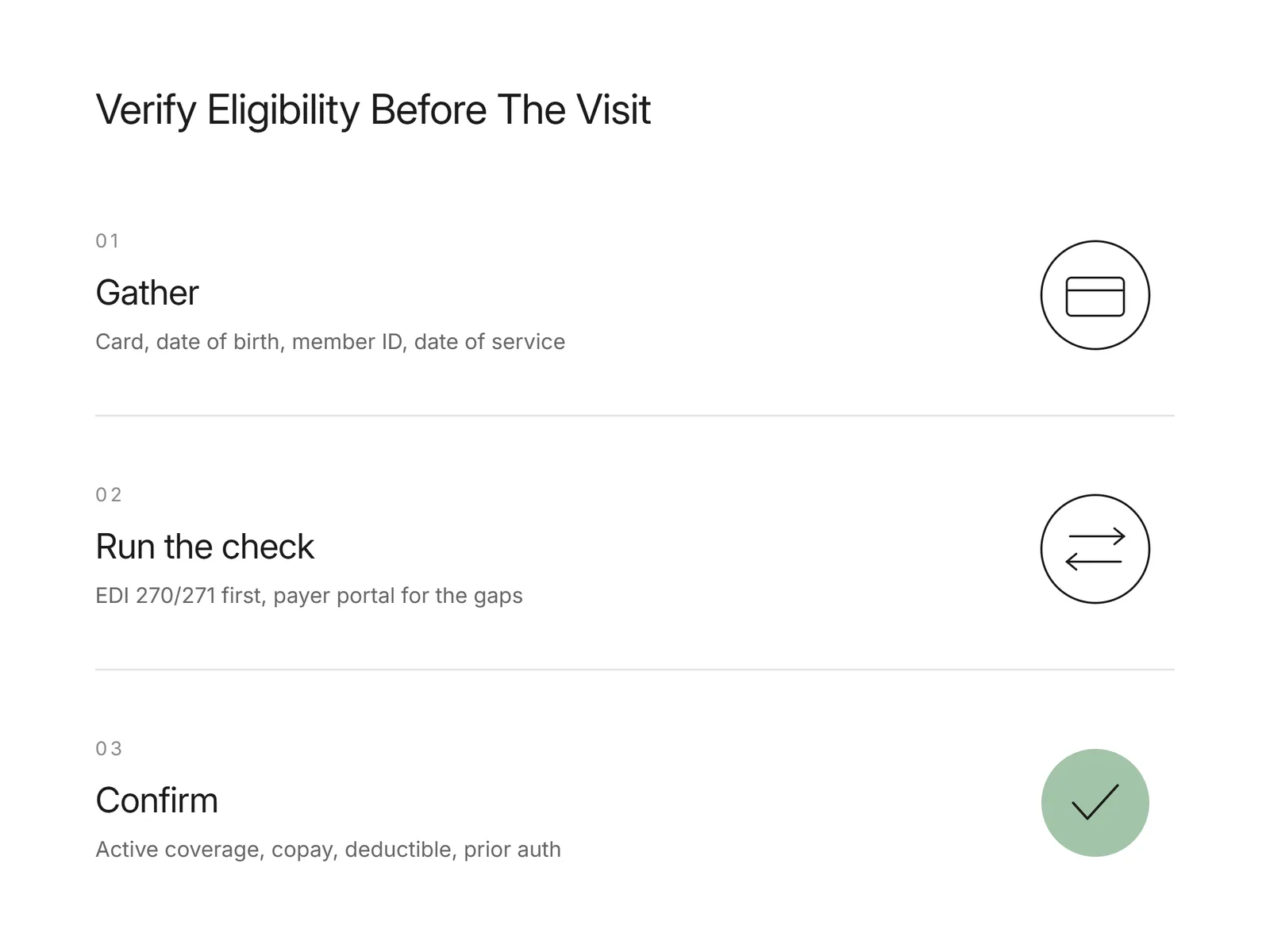
To verify insurance eligibility, collect the patient's insurance card and demographics, then run an insurance eligibility check through a clearinghouse using the X12 270/271 transaction or by logging into the payer portal. Confirm that coverage is active for the date of service, then read back the copay, deductible, remaining out-of-pocket amount, and any prior authorization requirement for the scheduled service. Write the result to the patient record so front-desk and billing staff work from the same verified data. The short version: gather the card, run the check, confirm active coverage, capture the patient's financial responsibility, and flag prior auth before the visit. Doing this upstream is how practices verify patient insurance before a claim is filed, which is where most avoidable denials begin.
How do you verify insurance eligibility step by step?
Verifying eligibility follows the same sequence for almost any payer. First, collect the insurance card and confirm the patient's name, date of birth, member ID, and group number. Second, run the check: submit an X12 270 eligibility inquiry through your clearinghouse and read the 271 response, or log into the payer portal for plans that need a manual lookup. Third, confirm coverage is active for the exact date of service. Fourth, capture the patient's financial responsibility: copay, deductible met and remaining, coinsurance, and out-of-pocket maximum. Fifth, check whether the scheduled service needs prior authorization. Sixth, write everything back to the patient record. Getting this right matters because registration and eligibility problems are a leading source of denials; MGMA reports that registration and eligibility remain the top reason for claim denials, at nearly 27%.
Want this mapped against your own call and claim volume? Book a 30-minute audit
What information do you need to check insurance eligibility?
An insurance eligibility check depends on accurate patient and plan data, so gather it before you run anything. You need the patient's full legal name and date of birth, the payer name, the member or subscriber ID exactly as printed on the card, and the group number when the plan carries one. Add the date of service and the specific service or CPT code, because those turn a general "coverage is active" answer into a benefit answer for the actual visit. When the patient is a dependent, you also need the subscriber's name and date of birth, since the policy is held in the subscriber's name and the payer matches on those fields. A single transposed digit in a member ID is a common reason an otherwise valid check comes back as no coverage found, so confirm the card details against a photo of the card rather than a verbal read.
The input list is fixed, which is the first sign a task can be handed over. Flexbone assembles those fields from the appointment, runs the check, and writes the result back, then escalates only the cases where the response did not answer the question. The escalation rule is derived from the responses themselves.
See what AI can run at your facility. In a 30-minute audit we map the calls, eligibility, and follow-ups Flexbone can take off your team first.
Book an auditHow does a 270/271 check differ from a payer portal?
These are the two channels for verifying coverage, and they cover different ground. The X12 270/271 is a standardized electronic transaction: your system sends a 270 eligibility inquiry to the payer or clearinghouse, and the payer returns a 271 with coverage status and benefits, usually within seconds. These transactions run under the federally adopted CAQH CORE operating rules for eligibility and claim status, which require real-time responses, return of patient financial responsibility, and defined error reporting. A payer portal, by contrast, is a website you log into one plan at a time. EDI is faster and covers most national payers, but a 271 often omits granular detail such as visit limits or service-specific authorization rules, and that is where a portal check fills the gap. In practice, a thorough eligibility process uses EDI first and falls back to the portal for the benefit details EDI leaves out.
What should an eligibility check confirm before the visit?
A complete check confirms five things, not just whether the card is active. Confirm active coverage for the date of service, including the plan's effective and termination dates. Confirm the copay for the visit type, since specialist and primary-care copays differ. Confirm the deductible: the annual amount, how much is met, and how much remains, because that drives what the patient owes today. Confirm coinsurance and the out-of-pocket maximum for services billed after the deductible. Finally, confirm whether the scheduled service requires prior authorization, and start that request early if it does. Prior authorization is worth flagging at scheduling rather than after a denial, and it is an area under active regulatory scrutiny: KFF documents that federal and state rules increasingly require human oversight of AI used in prior authorization and claims review. Capturing all five before the visit is what separates a real verification from a coverage-only lookup.
How does Flexbone verify insurance eligibility?
Most eligibility tools stop at the 270/271 and leave the portal work, the slowest and most manual part, to your staff. The 2024 CAQH Index measures how much administrative cost still sits in portal and phone-based checks, even as EDI adoption rises (see the CAQH Index report). Flexbone deploys agents that run eligibility across all three channels: payer portals, EDI 270/271, and phone where a plan requires it. The agents confirm active coverage, copays, deductibles, and prior authorization requirements, then write structured results back to the practice management system so billers can filter them rather than reading screenshots. The approach is audit-first, HIPAA compliant, and SOC 2 aligned, with exceptions such as conflicting portal and EDI data routed to your team for review. For the full workflow, see our guide to insurance eligibility verification and the AI insurance eligibility verification guide.
When should you verify a patient's insurance?
Verify before every scheduled visit, not only at the first appointment. Coverage changes when a patient switches jobs, changes plans at open enrollment, or moves in or out of Medicaid managed care, and none of those changes announce themselves. A common cadence is a batch eligibility check one to three days before the schedule, which leaves time to resolve inactive coverage or missing authorization, plus a same-day check for add-ons and walk-ins at check-in. Re-verifying on this rhythm catches terminated policies and plan changes before the claim goes out, rather than after the payer rejects it. If you want to see automated checks run against your own payer mix and post results into your system, book a demo.