Medical appointment scheduling software is a system that lets patients book, reschedule, and cancel visits and lets staff manage a practice calendar across providers, locations, and visit types. The core capabilities are online self-scheduling that patients use on their own time; provider and visit-type rules that route each request to the right slot for the right length of appointment; automated reminders by text, voice, and email; write-back to the electronic health record so the booking lands in the system of record; and waitlist management that fills openings when someone cancels. Good medical scheduling software also checks eligibility and referral requirements before a visit is confirmed. The goal is to keep the calendar accurate and full while reducing the phone volume a front desk carries, since scheduling is one of the most time-consuming phone tasks in a practice.
What is medical appointment scheduling software?
Medical appointment scheduling software coordinates the supply of provider time with patient demand for it. On the patient side, it presents open slots and takes a booking through a website, a patient portal, a text thread, or a phone call. On the staff side, it enforces the rules a practice runs on: which providers see which visit types, how long each visit takes, what needs to happen before a visit is confirmed, and how to handle cancellations. The value is availability and consistency, because patients increasingly expect to book outside office hours. MGMA reports that nearly nine in ten patients say the ability to schedule with digital tools is important, while only about 63 percent of providers offer it. Software closes part of that gap by taking bookings when the front desk is busy or closed.
Want this mapped against your own call and claim volume? Book a 30-minute audit
What features should you look for in healthcare scheduling software?
The features that matter most are the ones that keep the calendar correct without adding staff work. When you compare healthcare scheduling software, look for real-time availability read from the system of record rather than a copy that drifts out of sync; provider and visit-type rules that stop a patient from booking the wrong appointment length or the wrong clinician; reminders across text, voice, and email with easy rescheduling built in; a waitlist that can fill a slot automatically when a patient cancels; and eligibility or referral checks that run before the visit is confirmed. Reporting matters too, so a manager can see booking volume, cancellation patterns, and how full each provider's schedule runs. A product that only writes a request into a queue for staff to key in by hand is doing less than the name suggests.
Software lets a patient book online; the phone still carries the reschedules and the questions. Flexbone automates that phone side with voice agents that write to the same schedule. See AI patient coordinator.
See what AI can run at your facility. In a 30-minute audit we map the calls, eligibility, and follow-ups Flexbone can take off your team first.
Book an auditHow does medical scheduling software reduce no-shows?
Medical scheduling software reduces no-shows mainly through reminders and low-friction rescheduling, which give patients a simple way to keep an appointment or move it rather than skip it. A systematic review of telephone and SMS reminders for hospital appointments found that nearly all studies reported a benefit, with manual calls and automated messages both lowering non-attendance. The way slots are offered matters as well. A systematic review of open-access scheduling, which books patients into near-term availability, found that most studied clinics saw a significant decrease in no-show rates when the system was designed around patient and provider needs. Software supports both levers: it sends the reminders on a schedule and it makes near-term openings visible so a canceled slot can be refilled quickly.
How does AI voice scheduling differ from an online booking widget?
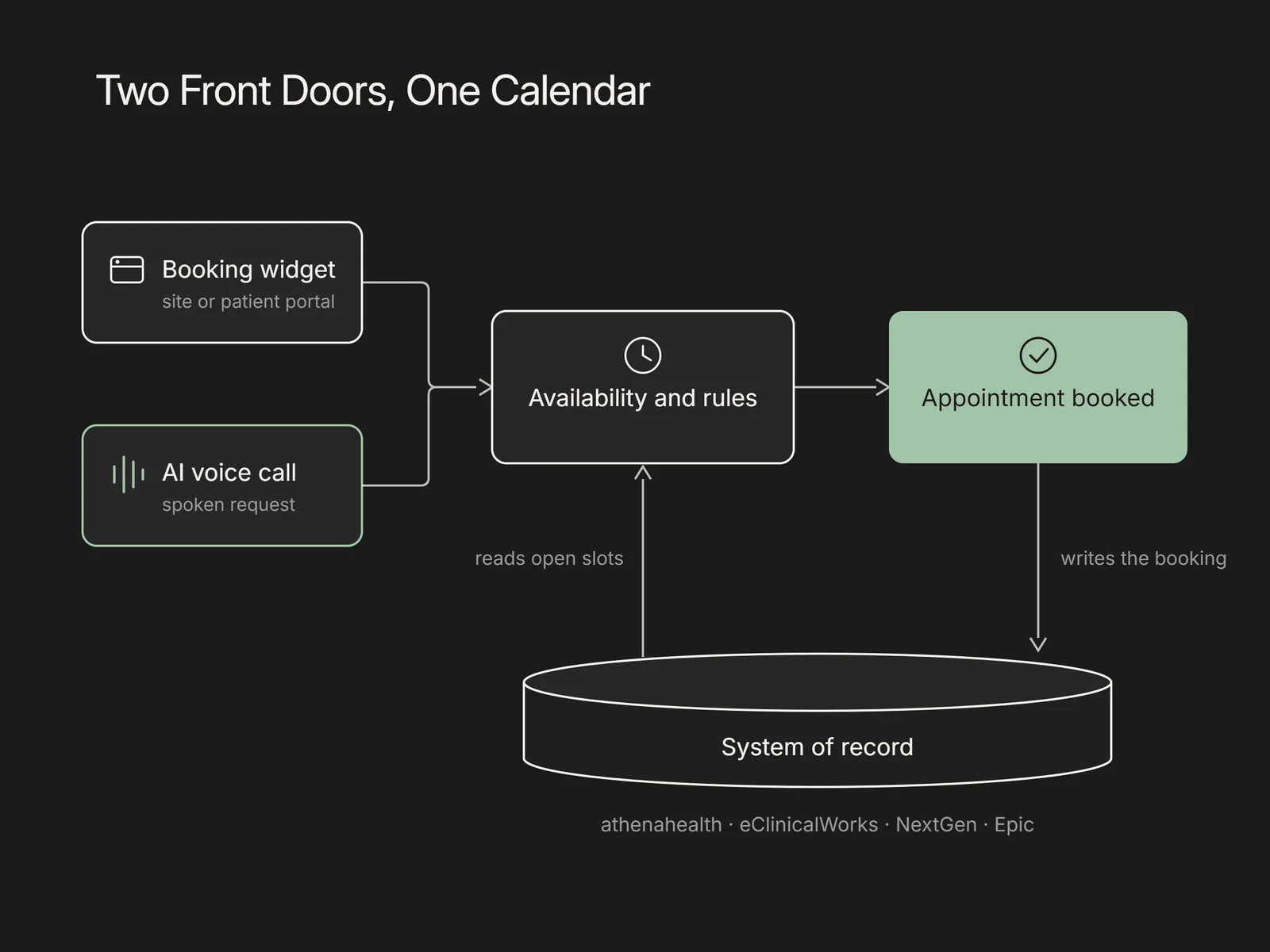
An online booking widget serves patients who are already online and willing to work through a form. That is a real segment, but it is not everyone, and a large share of scheduling still happens by phone. MGMA reports that scheduling is one of the most time-consuming phone tasks in a practice, at roughly a third of call time. AI voice scheduling answers that phone call, understands a spoken request, reads the same live availability the widget uses, and books the visit during the conversation. It also handles the parts a form struggles with, such as a patient who is unsure which visit type they need or who wants to move an existing appointment. The two channels reach different people, so it is common to run a booking widget and voice scheduling together rather than treating them as competing options. An automated healthcare receptionist is the broader version of this, covering reminders and coverage questions alongside booking.
How does scheduling software connect to the EHR?
The connection has two directions, and both need to work for the calendar to stay reliable. Reading is the first: the scheduling layer pulls live availability from the electronic health record or practice management system, so it never offers a slot that is already taken. Writing back is the second: once a patient confirms, the software records the appointment in the system of record with the correct provider, visit type, and duration, so the schedule staff work from matches what the patient booked. Common systems of record include athenahealth, eClinicalWorks, NextGen, and Epic, and the depth of that connection varies by product and by EHR. A booking that lands in the EHR without staff re-keying it is the difference between software that saves time and software that adds a second calendar to reconcile.
How Flexbone handles scheduling inside your EHR
A booking form takes a request and stops at the queue. Flexbone deploys AI voice agents that resolve scheduling during the call: the agent reads live availability, books into the correct provider and visit type, and writes the appointment back to athenahealth, eClinicalWorks, NextGen, or Epic. It can also send reminders, work a waitlist when a slot opens, and escalate anything clinical or sensitive to your team with the call context attached. The approach is audit-first, HIPAA compliant, and SOC 2 aligned, so every booking leaves a transcript and an outcome you can review. Scheduling is one part of a wider AI patient coordinator that also covers reminders, intake, and coverage questions.
How do you get started?
Start by mapping the scheduling rules you already run, since the software is only as good as the provider, visit-type, and eligibility logic behind it. Then decide which channels to cover first, whether that is a booking widget, voice scheduling, or both, and confirm the write-back path into your EHR. To see AI voice scheduling run against your own availability and system of record, book a demo.