Patient intake software is the system a practice uses to collect a patient's information before a visit: demographics, insurance and eligibility, medical and medication history, and signed consent forms. Instead of a paper clipboard handed over at the front desk, digital patient intake gathers this data through web or mobile forms, or through a phone conversation, validates it, and writes it into the electronic health record before the appointment. The point is a complete, accurate record ready when the patient arrives, so the front desk is not entering data during check-in and the clinician is not working from gaps. Good patient intake software also checks insurance eligibility ahead of time, flags missing fields, and routes anything unusual to a human. This guide covers what it does, the features that matter, and how it fits your EHR.
What is patient intake software?
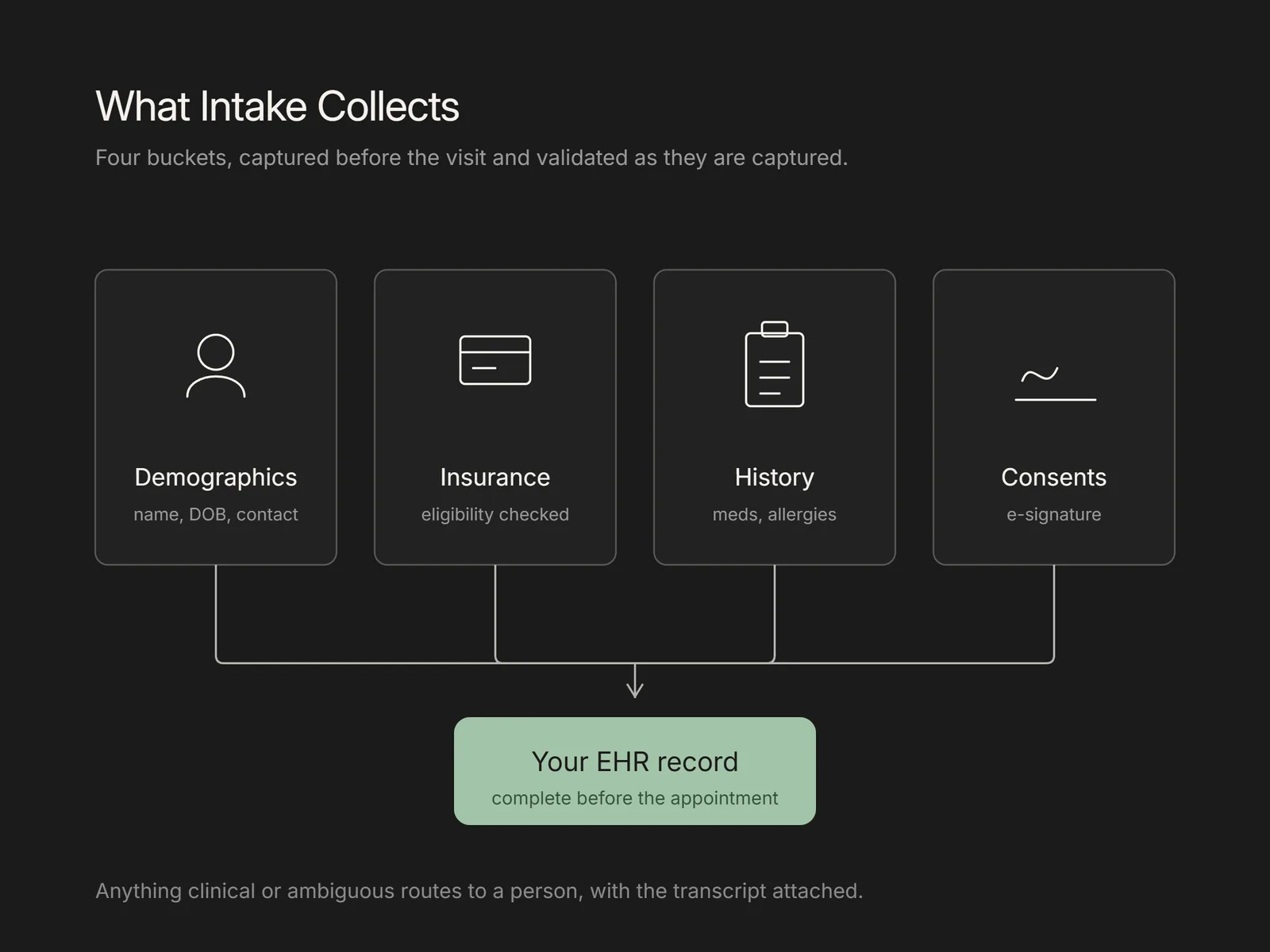
Patient intake software collects and structures the information a practice needs from a patient ahead of a visit, then delivers it to the system of record. That information falls into four buckets: demographics (name, date of birth, address, contact details), insurance and eligibility, clinical history (conditions, medications, allergies, reason for visit), and consents and authorizations. The software presents these as digital forms or a guided conversation, validates each field as it is captured, and writes the result into the EHR. The reason this matters is that the front desk is already stretched. MGMA reports that the phone remains the real front door for many patients, and that intake accounts for a meaningful share of the time staff spend on calls. Moving intake off the clipboard and into software shifts that data-entry work away from check-in.
Want this mapped against your own call and claim volume? Book a 30-minute audit
What features should patient intake software have?
Look for features that reduce manual work and protect data quality rather than a long form builder alone. The core set includes customizable digital forms for different visit types, field-level validation so a date of birth or member ID cannot be entered in the wrong format, and insurance capture with a real eligibility check against the payer before the visit. It should support consent and authorization e-signatures, prefill returning-patient data so people are not retyping what the practice already knows, and offer forms in more than one language. Two-way EHR integration is the feature that separates real intake software from a form that emails a PDF: the data must write back into the correct patient record and registration fields, not sit in a separate inbox. A patient-facing channel beyond the web, such as text or phone, widens who can actually complete intake. An AI patient coordinator can carry several of these functions in one workflow.
Intake forms still leave the insurance check and the follow-up on missing fields to staff. Flexbone automates those steps with agents that verify coverage and call patients for what the form missed. See AI patient coordinator.
How does digital patient intake reduce front-desk work and errors?
Digital patient intake reduces front-desk work by moving data entry to before the visit and to the patient, and it reduces errors by validating each field at the point of capture rather than after a claim is denied. When a patient completes intake at home, the front desk spends check-in confirming rather than typing, which shortens the line and cuts the transcription mistakes that come from reading a handwritten form. Validation catches a transposed member ID or a missing date before it reaches billing. Intake that includes an eligibility check also confirms coverage is active, which addresses a common category of front-end denial rooted in demographic and insurance data. Complete intake before the visit supports fewer no-shows as well: a systematic review of outpatient scheduling found that reminder and access interventions reduced no-show rates in most of the studies examined. The gains are bounded, though. Intake software does not fix clinical or coding denials, and a patient who enters wrong data confidently can still pass validation.
See what AI can run at your facility. In a 30-minute audit we map the calls, eligibility, and follow-ups Flexbone can take off your team first.
Book an auditHow does voice or phone intake differ from web forms?
Voice intake differs from a web form in the channel and in who does the typing, but the data it collects is the same. A web form asks the patient to read and type on their own device; a phone agent asks the questions aloud, listens to the answer, confirms spelling and dates back to the caller, and records the structured result. The difference matters because many patients still reach a practice by phone rather than a portal. MGMA reports that while nearly nine in ten patients say digital self-scheduling is important, only a minority actually self-schedule today, which leaves a large group who prefer to call. Web forms suit patients who are comfortable online and want to complete intake at their own pace; phone intake reaches patients who will not open a portal, who have questions as they go, or who are calling to book anyway. In the practices we work with, both channels earn their place, because forcing everyone into one leaves records incomplete. An automated healthcare receptionist can run the phone side of intake alongside scheduling.
How Flexbone handles patient intake
A generic form tool captures data and stops at an inbox. Flexbone deploys AI voice and document agents that complete new-patient intake by phone and from submitted documents, then write the verified demographics, insurance, and history into the EHR before the appointment. The voice agent asks the standard intake questions, reads names, dates, and member IDs back to the caller to confirm them, and escalates anything clinical or ambiguous to your staff with the full transcript attached. The approach is audit-first, HIPAA compliant, and SOC 2 aligned, so every intake leaves a reviewable record of what was captured and how. Flexbone works inside your existing system of record rather than adding a separate portal patients have to learn. It handles the routine intake volume and hands the exceptions to a person, so the front desk starts each day with records that are already complete instead of a stack to key in.
Does patient intake software integrate with the EHR and stay HIPAA compliant?
EHR integration and HIPAA compliance are the two questions to settle before buying, because intake software that fails either one creates more work than it saves. Integration should be two-way: the software reads existing patient data to prefill returning visits and writes new and updated fields back into the correct record, whether the EHR is Epic, athenahealth, eClinicalWorks, NextGen, or Cerner. Ask how the write-back works, which fields it maps, and what happens when a record does not match. On compliance, intake software handles protected health information, so the vendor is a business associate and must sign a business associate agreement. HHS is explicit that a covered entity must have a contract that binds the business associate to safeguard PHI. Beyond the signed BAA, confirm encryption in transit and at rest, access controls, audit logging, and a defined retention policy for intake data, forms, and any call recordings. A vendor that treats HIPAA as documented technical safeguards rather than a marketing claim is the one to trust with intake.
Ready to see AI-driven intake run against your workflows? Book a demo.